Line it up
Sub-sample Delay pulls a channel earlier or pushes it later. Kick and bass, snare top and bottom, DI and amp, lined up below a single sample. No zipper noise on the move.
Apollo View Modular - Eurorack Modules


Line it up
Align is a precision time-and-phase alignment tool. It lines up two signals that fight in time or phase (kick and bass, snare top and bottom, DI and amp, multi-mic drums, M/S mastering timing) with sub-sample delay, broadband phase rotation, a tunable allpass, and per-channel filtering. Align your signals, or use the same controls for creative work.
Latestv0.9.2.0·29 Jun 2026·What's new ›·Manual ›
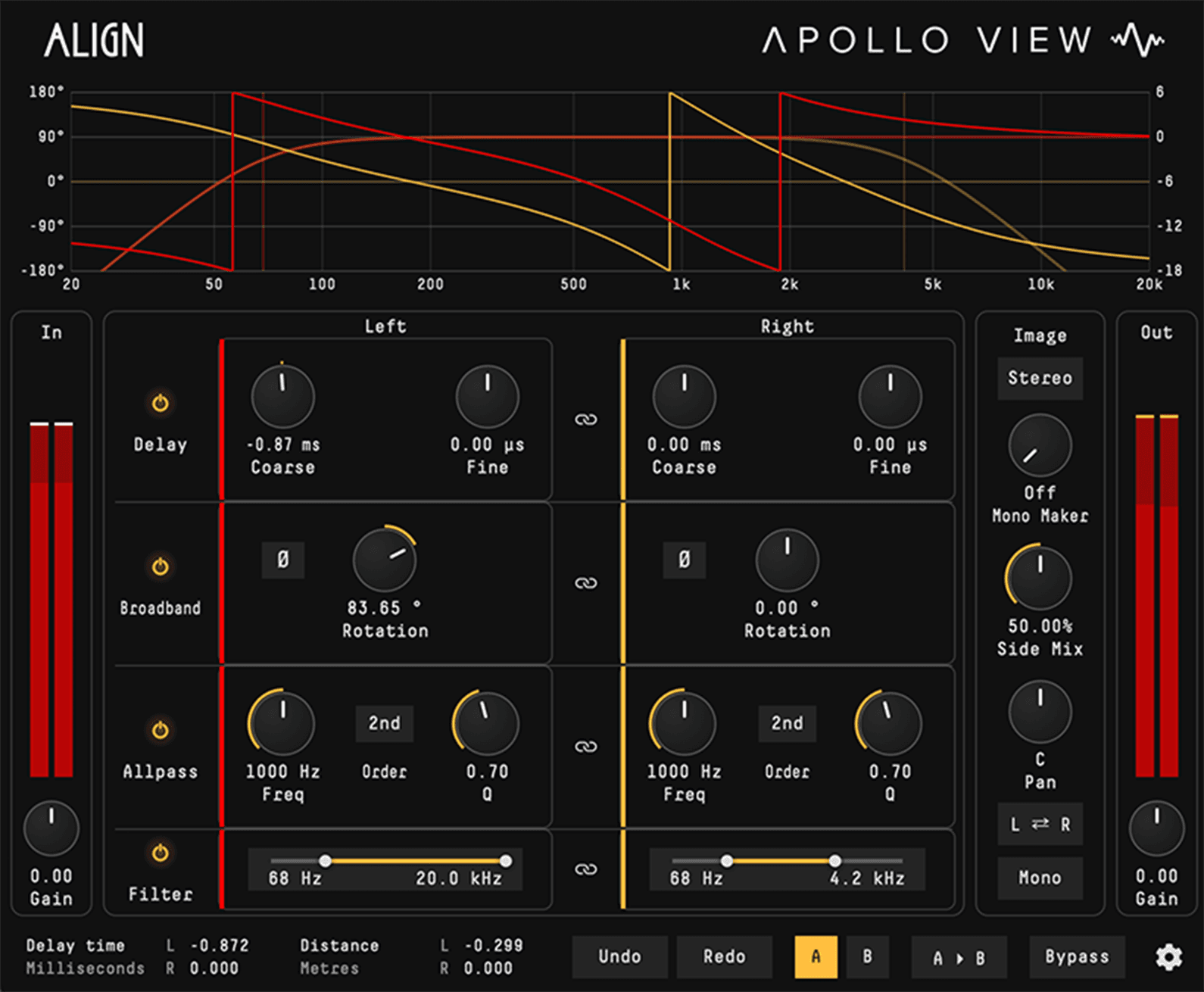
Sub-sample Delay pulls a channel earlier or pushes it later. Kick and bass, snare top and bottom, DI and amp, lined up below a single sample. No zipper noise on the move.
Broadband Rotation and the Allpass move phase only. Magnitude stays flat at every frequency, so two sources align without recolouring either one.
The same per-channel Delay, Rotation, Allpass, and Filter that repair alignment also build Haas width, decorrelate the Side, and shape the stereo image.
Overview
Align is the corrective half of the workflow. DeltaScope shows two signals drifting apart in time or phase; Align slides them back together, sub-sample Delay, broadband phase Rotation, a single tunable Allpass, per-channel polarity, and 2-pole filtering, all set against a live phase curve that draws the combined Broadband, Allpass, and Filter response over a live spectrum of the signal. DeltaScope shows the problem; Align fixes it. The same controls do creative work. Per-channel sub-sample Delay sets a Haas spread. Side-only Rotation and Side Mix past neutral widen the image. The Allpass adds depth around one band. Per-side Filter shapes tone and width. Fixing leads, but every move runs either way. Work in Stereo or Mid-Side, link the sections to move together or unlink for independent control per channel, and finish in the output stage. Magnitude untouched throughout. Nulls bit-exact at neutral.
Sub-sample time shift, by ear or by the numbers.
A polyphase sinc fractional delay shifts a channel far below a single sample. Coarse covers ±30 ms; Fine trims ±100 µs on its own control. Advance or delay, per channel. The readout shows the shift in ms, samples, or metres and feet. On by default.
Pull a late close-mic earlier or push an early one back. Reported latency lets Align advance as easily as delay, so the lagging channel moves, not everything else in the session.
A few milliseconds of Delay on one channel spreads a mono part. Sub-sample Fine resolution sets the exact offset; the Mono Mix checks the fold.
Coarse covers ±30 ms for the gross move; Fine trims ±100 µs on a separate control. A high-resolution polyphase sinc kernel resolves below one sample with no zipper noise.
Drag the readout to switch units, ms, samples, or metres and feet. Line a room mic up by the distance it sat from the source.
Continuous phase rotation and per-channel polarity, magnitude flat.
A single bipolar Rotation control turns phase −180° to +180° through a linear-phase FIR Hilbert and a delay-matched dry path. 0° is a clean bypass, ±90° a pure Hilbert, ±180° a clean polarity flip. A per-channel Ø inverts polarity at the output. On by default.
Rotate the whole band until two sources reinforce instead of cancel. Magnitude stays flat at every frequency, so the alignment lands without touching the frequency balance.
Rotate the Side channel alone to decorrelate the edges and open the stereo image. The Mid holds the centre; a mono fold keeps only the Mid, so the widened Side drops out on fold-down. Check it with Mono Mix.
0° passes through untouched, ±90° is a true Hilbert transform, ±180° is an exact polarity flip. One continuous control spans the range.
A dedicated Ø flips each channel's polarity independently, a hard 180°, applied at the output after every other stage.
One tunable stage. Phase only, magnitude flat.
A single allpass stage bends phase around one frequency while magnitude stays flat, the move SSL X-Phase and Little Labs IBP are known for, on a curve you can watch. Freq 20 Hz–20 kHz, Q 0.1–10, 1st or 2nd order, polarity. Off by default.
Slide the phase relationship into place around one band (the crossover region of a multi-mic source, a stubborn low-mid) while the tone stays as it was.
Run the Allpass on one channel to add depth around a chosen band. The image gains dimension with no level change, a quasi-stereo move steered to the exact frequency.
Sweep the corner 20 Hz–20 kHz and set Q 0.1–10. 1st order swings to −180°, 2nd order to −360° with Q. Switch order click-free.
The phase curve draws the allpass S-curve sliding across a live spectrum of the signal as you sweep, so you can see exactly which band the stage is working on.
2-pole HP and LP per channel, off at the ends.
A clean 2-pole high-pass, 20 Hz–15 kHz, and low-pass, 30 Hz–20 kHz, on each channel. Both read Off at the extremes. Filters cut, never boost. Off by default. Trim what does not belong before the signal leaves, or shape width per side.
Roll sub-rumble off the bottom and air-band hiss off the top. A 2-pole slope per channel pulls what does not belong without reaching for an EQ.
High-pass one channel only to lift the wide content into the mids while the lows stay centred. A clean stereo spread from a frequency difference between the channels.
HP and LP run independently on each channel or bus. Cut one side, leave the other, or set both to match.
Both filters read Off at the extreme of travel, so a parked Filter is a true bypass, no residual slope on the signal.
Stereo or Mid-Side. Link to move together, unlink to run free.
Work in L/R, or flip the whole plugin to Mid-Side via a lossless sum/difference matrix that re-encodes to L/R. Each section links the two sides to one set of controls, or unlinks for independent control per channel or bus. Labels follow the mode automatically.
Unlink to advance the left mic alone, or rotate phase on one channel only. Linked, both sides follow a single set of controls, fix a stereo pair as one.
In Mid-Side, push the Side for width and hold the Mid for focus. Rotate the Side, delay the Side, filter the Side, image work the L/R view cannot reach.
Each section carries its own Link. Linked sides share controls; unlinked sides run Delay, Rotation, Allpass, Filter, and polarity per channel.
Unlinked, the phase curve draws both sides at once, red and gold (Left and Right, or Mid and Side) so each move reads at a glance against the other. Click a channel's colour chip to recolour its curve, spectrum and accent, saved with the session.
The finishing stage: Mono Maker, Side Mix, Pan, Swap.
The output stage, at the end of the chain, finishes the stereo image. Mono Maker folds lows to mono on the Side, 20–500 Hz. Side Mix balances M against S, 0–100%, 50% neutral. Plus Pan, L/R Swap, and a Mono Mix to check the fold. Routing for Stereo or M/S.
Mono Maker folds everything below a corner, 20–500 Hz, to mono on the Side. The low end stays centred and translates to mono subs while the top keeps its width.
Side Mix scales the Side from 0–100% around a 50% neutral to rein width in or open it up. Pan places the whole image; Swap exchanges L and R.
Mono Mix sums the output to mono at any time. Build width upstream, fold it down here, and confirm the picture holds without a second plugin.
The output stage runs after every alignment stage, so image moves sit on the corrected signal. Routing follows Stereo or Mid-Side.
The same controls, pointed at finding a sound instead of fixing one.
Nothing here is a mystery knob. The Delay, Rotation and Allpass that line two signals up will build width, depth and shape when you aim them at a sound instead of a problem, and they read in milliseconds, degrees and hertz the whole way. Unlink the channels, or flip to Mid-Side, and every stage runs on one side alone. Finish in the output stage: Side Mix past neutral for width, Mono Maker to hold the low end in the centre, Mono Mix to check the fold. Magnitude stays flat throughout, so what changes is the image and the shape, not the tone.
Unlink Delay and push one channel a few milliseconds behind the other, inside the Haas window, and a mono part opens into a wide stereo image. Coarse reaches ±30 ms, Fine sets the exact offset, and the numbers are real, so the spread is repeatable.
In Mid-Side, rotate the Side alone. The edges decorrelate and breathe while the Mid, kick and vocal, stays rock-solid, and a mono fold keeps only the Mid, so nothing you widened comes back to bite.
Broadband Rotation moves where the energy sits in the cycle without changing the spectrum. Push a kick's peak forward or tuck it down by phase alone, with no transient designer in the chain.
Run the Allpass on one channel only, steered by Freq and Q, and the image gains dimension around that band with no level change to give it away. A quasi-stereo move you can watch on the phase curve.
Capabilities
Sub-sample timing, broadband phase rotation, a tunable allpass, polarity flip, and HP/LP filters: five corrective tools in one plugin.
Every control runs per channel, in L/R or Mid-Side. Link the two to move together, or unlink to work each side on its own.
Mono Maker folds the lows to mono. Side Mix sets the stereo width. Plus Pan, L/R Swap, and a mono check.
Broadband, Allpass and Filter summed and drawn full width, with a live spectrum behind them. Two curves when unlinked, red and gold, Left and Right, or Mid and Side.
Support
VST3 and AU. macOS 13 Ventura or later, Intel and Apple Silicon native.
One licence key, activated locally in the plugin. No account, no dongle, no iLok.
Direct email support. Feature requests welcome.
Windows, AAX, and CLAP support are in development.
Comparison
| Feature | Align | Voxengo PHA-979 | SSL X-Phase | Eventide P. Time Align | Little Labs IBP |
|---|---|---|---|---|---|
| Alignment | |||||
| Sub-sample time shift | ✓ | Whole-sample | Whole-sample | ✓ | Whole-sample |
| Broadband phase rotation | ✓ | ✓ | — | — | ✓ |
| Frequency-specific allpass | ✓ | — | ✓ | — | Hi/Lo |
| Stereo | |||||
| Full Mid-Side | ✓ | — | — | — | — |
| Per-channel link / unlink | ✓ | ✓ | ✓ | — | — |
| Stereo width control | ✓ | ✓ | — | — | — |
| Filtering | |||||
| High-pass / low-pass filters | ✓ | — | — | — | — |
| I/O | |||||
| Input gain | ✓ | — | ✓ | — | — |
| Output gain | ✓ | ✓ | ✓ | — | — |
| Sum-to-mono / mono check | ✓ | ✓ | — | — | — |
| Workflow | |||||
| A/B compare | ✓ | ✓ | ✓ | ✓ | — |
| Live phase-response curve | ✓ | — | ✓ | — | — |
Complete the workflow
DeltaScope is the diagnostic half of the workflow: compare any two signals in time, frequency, and phase, and see exactly what changed.
Meet DeltaScope ›Still got questions? Read the Manual, or check our FAQ and Refund Policy