Unified display
Scope, spectrum, and meters share one window: the whole picture without juggling plugins or windows.
Apollo View Modular - Eurorack Modules


See the difference
Scope, spectrum, and metering in a single view, coloured by frequency so you can see where every part of the signal lives. Route a second signal in and see exactly what your processing changes in time, frequency, and phase. The visual feedback you need to make confident mix decisions.
Latestv1.2.4·25 Sept 2026·What's new ›·Manual ›
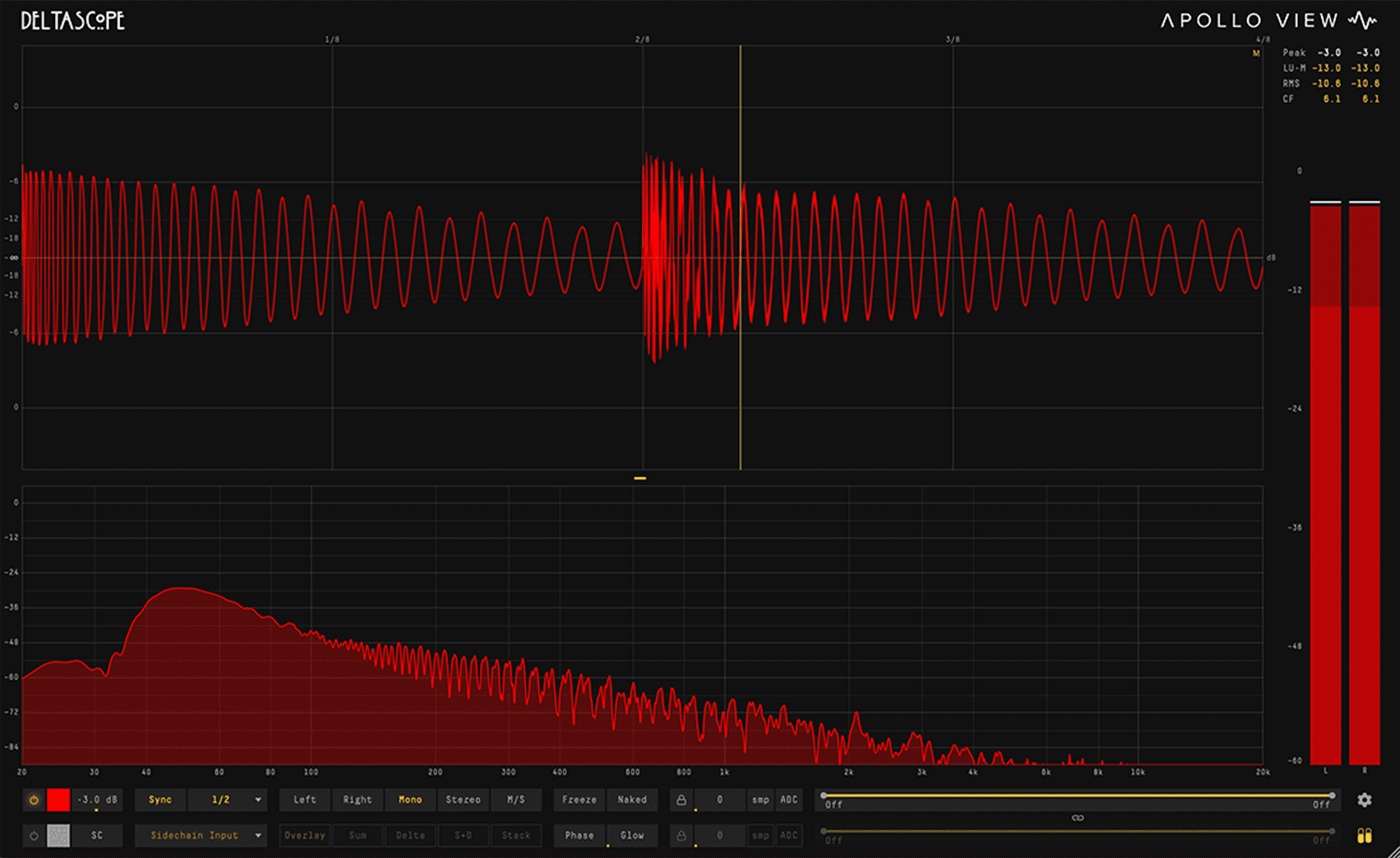
Scope, spectrum, and meters share one window: the whole picture without juggling plugins or windows.
Route a second signal via sidechain or link to another instance on any track. No bus routing required.
Frequency, amplitude, phase, and duration: read directly from the waveform. Alt+hover locks to a single cycle instantly.
Overview
DeltaScope is an audio analyser that shows you what your processing is actually doing. Null test any two signals: switch to Delta mode to see, and optionally hear, exactly what changed. Isolate frequency bands, map phase correlation across time, and measure directly from the waveform. Zero latency. Minimal CPU.
No bus routing. No setup. Just drop it on two tracks.
Place DeltaScope on two tracks and they find each other automatically, by track name. Or route any signal via sidechain. Either way, you're comparing in seconds.
Overlay, stack, sum, delta, and sum+delta split. Show or hide each channel independently. Because the relationship between two signals is rarely captured by a single view.
Instances find each other automatically by track name, just drop and compare.
Your processed signal minus the original: see and hear exactly what changed. What the compressor took away. What the EQ reshaped. What the limiter caught. Route the difference to your monitors to listen critically, or just watch it on screen.
Latency differences between tracks are detected and corrected automatically, even across different plugin chains.
Focus on the frequency range you care about, the display stays accurate.
High-pass and low-pass filters on both main and sidechain channels. Narrow your view to any frequency range, the waveform stays clean, phase-accurate, and free of artefacts.
Isolate any frequency range from 20 Hz to 20 kHz. At default positions the filters bypass completely, no processing overhead.
Drag individual cutoffs or drag the band between them to shift the window while preserving bandwidth.
Lock main and sidechain filters together so adjusting either one moves both. Compare the same frequency range across two signals.
The filters don't smear the waveform or shift the phase, what you see on screen is what's actually in the signal.
Drag across any region of the waveform for instant readouts.
Selection edges snap to zero crossings automatically. The readout appears instantly: frequency, MIDI note with cents deviation, cycle count, peak/trough/RMS amplitude, and duration in ms or beats.
Frequency detection works directly on the waveform: the nearest note and its cents offset, accurate to within a couple of cents on a clean, steady tone, with no FFT resolution limit.
Selection edges lock to the fundamental's zero crossings, not harmonic crossings, so your measurement always frames the right cycle.
Alt+hover for instant single-cycle detection at the cursor without dragging.
In split-view modes, each lane measures its own signal independently.
See where signals reinforce and where they cancel, not just that they do.
Most correlation meters give you a single number for your entire signal. DeltaScope maps correlation across time, so you can see exactly which moments cause problems.
Vertical bars along the timeline, gold where signals reinforce, red where they cancel.
A continuous colour field showing correlation intensity across time, spot trouble at a glance.
Control the resolution, weighting, and blend to match the level of detail you need.
Link correlation to the band filters to focus on a specific range, spot exactly where problems are so you know what to fix.
View one signal's spectrum, or compare two.
A full spectrum analyser, in the same window as the scope. Read one signal on its own, or switch to Delta mode and compare two, to see exactly what changed between them, frequency by frequency. Switch on Colour by Frequency and the curve is painted red at the bass through green to violet at the top, peak hold included, and the colours stay with their frequencies when you zoom.
The Difference view is the scope's Delta in the frequency domain, the spectrum of what's different between two signals. It reacts to timing as well as level, so it catches phase and alignment issues, not just tone.
Put DeltaScope pre and post your processing and see the exact frequency changes it's making, great for verifying Pultec EQ moves, what a compressor reshapes, what your chain does to the tone. Phase shifts read flat, so a curve means real tone changes, not timing.
Two bass notes a semitone apart merge into one lump on any single FFT size. Multi FFT analyses the low end with longer windows and separates them, while the rest of the spectrum keeps its speed.
A crosshair reads frequency, note, and dB under the pointer, plus each band's Max, Min, and RMS, so you see how much it moves, not just where it sits. Hold Option to snap to the nearest peak.
Seven measurement modes in one meter strip.
Sample peak, RMS, true peak, crest factor, and LUFS: all in one meter strip. Show or hide it with a single click.
LUFS momentary, short-term, and integrated, readings that match streaming and broadcast delivery specs.
Catches intersample peaks that standard sample-level meters miss.
Peak-to-RMS ratio, see your dynamic range at a glance.
A slim strip beside the scope and spectrum, full delivery metering that never takes over the display.
Control what you see, how you see it, and nothing else.
Show scope, spectrum, or both, drag the divider to set the ratio. Choose your waveform colours, or let Colour by Frequency paint them. Add analogue glow. Strip the interface down to nothing. Save any setup as default so every new instance starts the way you like.
Drag the divider between scope and spectrum. Show one, both, or toggle the meter strip, the display adapts to your workflow.
Pick your own waveform colours for main and sidechain channels independently, and add CRT-style phosphor glow for a classic oscilloscope feel, at whatever intensity you like.
Tint the waveform by what it contains: bass reads red, mids green, highs blue, and a kick under hats shows both at once. The spectrum can follow suit, red at the bass through green to violet at the top, peak hold included. Main and sidechain each have their own switch.
Hide all UI chrome, just the waveform, the spectrum, or both. Clean output for video content, tutorials, and livestreams.
Capabilities
22 divisions (straight, dotted, and triplet) from 1/128th note to 16 bars. Transients lock to the same position every cycle.
Scroll to zoom up to 64× magnification. Cmd+drag (Ctrl+drag on Windows) to pan. Double-click to reset.
Custom colours or Colour by Frequency, analogue glow, full screen to 4K, or Naked Mode: set the display up your way and save it as the default. Export the display as a PNG, and save or share your settings.
Minimal CPU. Light enough to run on every track that matters.
Support
VST3, AU, AAX and CLAP on macOS 13 Ventura or later, Intel and Apple Silicon native. VST3, AAX and CLAP on Windows 10 or later, 64-bit. One licence key covers both.
One licence key, activated locally in the plugin. Simple, fast, no account required.
Direct email support. Feature requests welcome.
Ableton Live, Logic Pro, Pro Tools, Cubase, Bitwig Studio, REAPER, FL Studio, and any other host that takes VST3, AU, AAX or CLAP.
Comparison
Scope is the free oscilloscope; DeltaScope adds the full audio analyser toolset: null testing, spectrum, metering, and measurement.
| Feature | Scope | DeltaScope |
|---|---|---|
| Display | ||
| Full visual quality | ✓ | ✓ |
| Fully resizable window | ✓ | ✓ |
| All sync divisions (1/128 – 16 bars) | ✓ | ✓ |
| MIDI-synced timebase (note-locked, phase-aligned) | — | ✓ |
| MIDI octave offset (±4 octaves) | — | ✓ |
| Gain control | ✓ | ✓ |
| Clip overlay (on the waveform) | ✓ | ✓ |
| Clip border | ✓ | ✓ |
| Custom waveform colours | ✓ | ✓ |
| Colour by Frequency (waveform) | ✓ | ✓ |
| Adjustable waveform glow | ✓ | ✓ |
| Naked mode (hide all UI chrome) | — | ✓ |
| Channel Modes | ||
| L / R / Mono / Stereo | ✓ | ✓ |
| Mid / Side | — | ✓ |
| Analysis | ||
| Freeze + hold | ✓ | ✓ |
| Zoom + pan | ✓ | ✓ |
| Measurement overlay | — | ✓ |
| Spectrum analyser | — | ✓ |
| Multi FFT (multiresolution bass analysis) | — | ✓ |
| Colour by Frequency (spectrum analyser) | — | ✓ |
| Delta spectrum (difference + magnitude) | — | ✓ |
| Phase correlation meter | — | ✓ |
| Level meter | — | ✓ |
| Routing | ||
| Sidechain input | — | ✓ |
| Inter-instance audio sharing | — | ✓ |
| Sum + difference (delta) modes with delta monitoring | — | ✓ |
| Processing | ||
| LP / HP band filter | — | ✓ |
| Manual sample / ms offset | ✓ | ✓ |
| Auto sample delay compensation | — | ✓ |
| Export | ||
| Image export (high-resolution PNG) | ✓ | ✓ |
| Settings export and import | ✓ | ✓ |
| Platforms | ||
| macOS 13 Ventura or later (Intel and Apple Silicon) | ✓ | ✓ |
| Windows 10 or later (64-bit) | ✓ | ✓ |
| Formats | ||
| VST3 | ✓ | ✓ |
| AU (macOS) | ✓ | ✓ |
| AAX | ✓ | ✓ |
| CLAP | ✓ | ✓ |
Complete the workflow
Align is the corrective half of the workflow: sub-sample delay, broadband phase rotation, and per-channel polarity, set against a live phase curve.
Meet Align ›Still got questions? Read the Manual, or check our FAQ and Refund Policy