Free and complete
Not a trial. Not a demo. The full oscilloscope, yours to keep.
Apollo View Modular - Eurorack Modules


See the signal
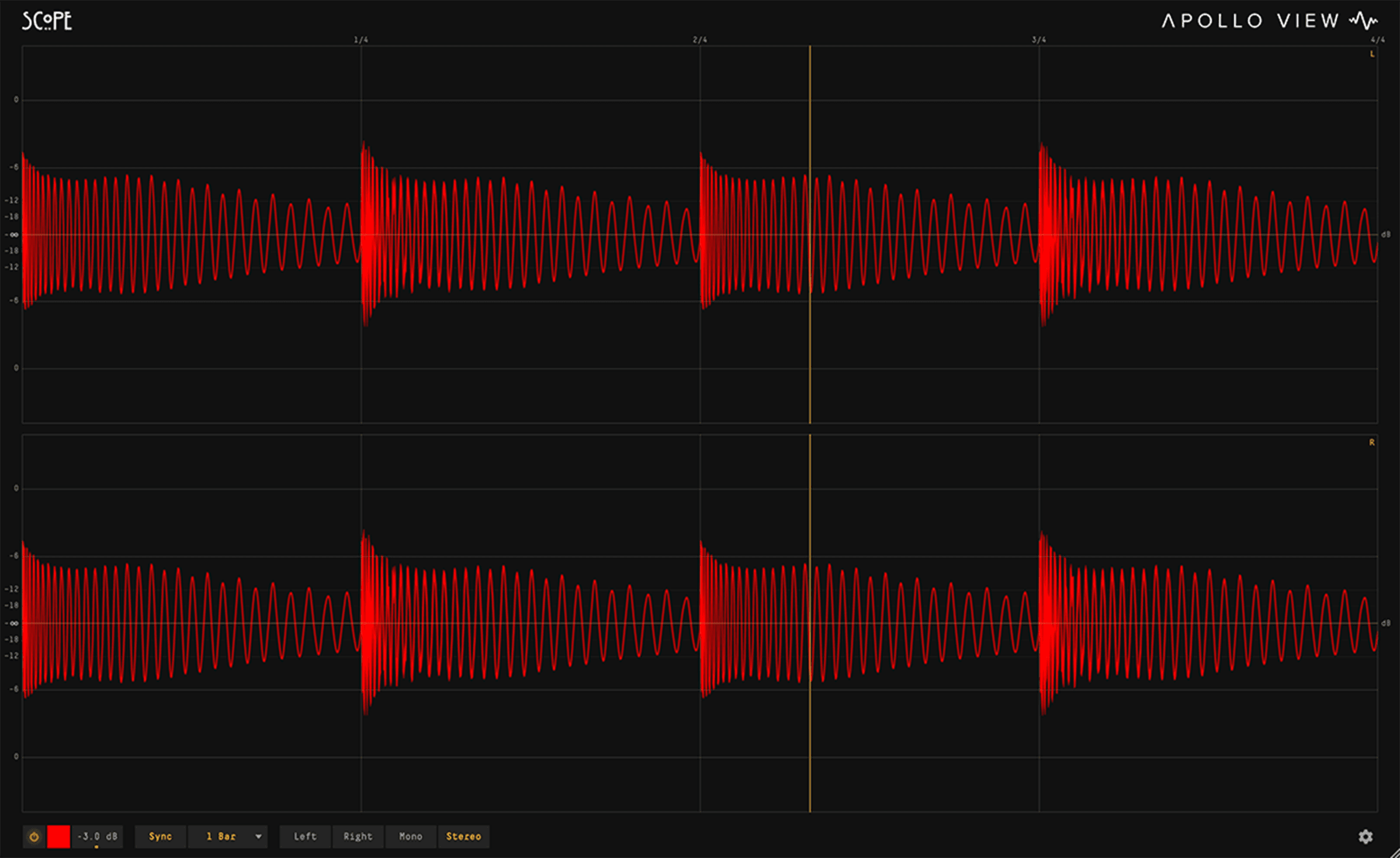
A beat-synced oscilloscope built on the same rendering engine as DeltaScope. See your signal: cleanly, accurately, in real time. Zero latency. Free to keep.
Latestv1.2.2·25 Sept 2026·What's new ›·Manual ›
Not a trial. Not a demo. The full oscilloscope, yours to keep.
Hold the waveform while the audio keeps playing, then zoom into a transient and pan across it at your own pace.
Nothing added to your audio path, drop it on any track and monitor in real time while you mix.
Overview
Scope gives you a clear, accurate view of your signal in real time. Beat-synced or free-running, sharp at any size. Zero latency. Minimal CPU. If you find yourself wanting to compare two signals, isolate a frequency band, or measure a waveform, DeltaScope adds those capabilities.
Lock your waveform to the tempo for repeatable, stable views.
22 beat divisions from 1/128th note to 16 bars: straight, dotted, and triplet. PPQ-snap locks transients to the same position every cycle. Free-run mode available for ms, Hz and note-based time windows. If upstream latency shifts your timing, a manual sample or ms offset nudges the waveform back onto the grid and locks once you have it set.
Your waveform stays locked to the beat, every division from 1/128th note to 16 bars.
PPQ-snap locks transients to the same position every cycle, no jitter, no drift.
Switch to ms, Hz or note-based windows when you don't need tempo sync. Dial a note from C0 to C8 and the window holds one, two or four cycles of it.
Scale the display from -36 dB to +36 dB to focus on the detail that matters.
Full visual quality from the DeltaScope rendering engine.
Custom waveform colours, or Colour by Frequency, which tints the trace by what it contains. Adjustable phosphor-style glow. Polarity-aware clip indicators. Resize the window to any size, the display stays sharp and responsive, up to 4K.
Set your waveform colour to match your workflow, and dial in CRT-style phosphor glow from clean to full. Both are saved with your session.
Tint the waveform by what it contains: bass reads red, mids green, highs blue, and a kick under hats shows both at once, so you can see where in the spectrum each part of the waveform lives. Toggle it in the settings cog.
A clip overlay marks overs on the waveform, and clip markers light the scope border, polarity-aware, top for positive and bottom for negative. Toggle either in the settings cog.
Left, Right, Mono, or Stereo, switch instantly.
Hold the picture, then look as closely as you like.
Freeze holds the waveform on screen while the audio keeps playing. Scroll to zoom into a transient, drag to pan along it, double-click to come back out. Previously DeltaScope features, now in the free Scope.
One click and the trace stays put while playback carries on. Click again to let it run.
Zoom in up to 64 times around the point under your pointer, so a single kick fills the display.
Move along the frozen waveform at your own pace. Double-click resets to the full view.
Catch the shape of a transient, the length of a tail, the moment two sounds overlap, without chasing them.
Support
VST3, AU, AAX and CLAP on macOS 13 Ventura or later, Intel and Apple Silicon native. VST3, AAX and CLAP on Windows 10 or later, 64-bit. One licence key covers both.
Free to keep. No trial, nothing locked; DeltaScope is a separate plugin, not an unlock. Activate with a free licence key, no dongle, no iLok.
Direct email support. Feature requests welcome.
Ableton Live, Logic Pro, Pro Tools, Cubase, Bitwig Studio, REAPER, FL Studio, and any other host that takes VST3, AU, AAX or CLAP.
Comparison
Scope is the free oscilloscope; DeltaScope adds the full audio analyser toolset: null testing, spectrum, metering, and measurement.
| Feature | Scope | DeltaScope |
|---|---|---|
| Display | ||
| Full visual quality | ✓ | ✓ |
| Fully resizable window | ✓ | ✓ |
| All sync divisions (1/128 – 16 bars) | ✓ | ✓ |
| MIDI-synced timebase (note-locked, phase-aligned) | — | ✓ |
| MIDI octave offset (±4 octaves) | — | ✓ |
| Gain control | ✓ | ✓ |
| Clip overlay (on the waveform) | ✓ | ✓ |
| Clip border | ✓ | ✓ |
| Custom waveform colours | ✓ | ✓ |
| Colour by Frequency (waveform) | ✓ | ✓ |
| Adjustable waveform glow | ✓ | ✓ |
| Naked mode (hide all UI chrome) | — | ✓ |
| Channel Modes | ||
| L / R / Mono / Stereo | ✓ | ✓ |
| Mid / Side | — | ✓ |
| Analysis | ||
| Freeze + hold | ✓ | ✓ |
| Zoom + pan | ✓ | ✓ |
| Measurement overlay | — | ✓ |
| Spectrum analyser | — | ✓ |
| Multi FFT (multiresolution bass analysis) | — | ✓ |
| Colour by Frequency (spectrum analyser) | — | ✓ |
| Delta spectrum (difference + magnitude) | — | ✓ |
| Phase correlation meter | — | ✓ |
| Level meter | — | ✓ |
| Routing | ||
| Sidechain input | — | ✓ |
| Inter-instance audio sharing | — | ✓ |
| Sum + difference (delta) modes with delta monitoring | — | ✓ |
| Processing | ||
| LP / HP band filter | — | ✓ |
| Manual sample / ms offset | ✓ | ✓ |
| Auto sample delay compensation | — | ✓ |
| Export | ||
| Image export (high-resolution PNG) | ✓ | ✓ |
| Settings export and import | ✓ | ✓ |
| Platforms | ||
| macOS 13 Ventura or later (Intel and Apple Silicon) | ✓ | ✓ |
| Windows 10 or later (64-bit) | ✓ | ✓ |
| Formats | ||
| VST3 | ✓ | ✓ |
| AU (macOS) | ✓ | ✓ |
| AAX | ✓ | ✓ |
| CLAP | ✓ | ✓ |
Need deeper analysis?
DeltaScope is our audio analyser plugin, built on the same engine: null test any two signals, isolate and hear the difference, map phase correlation across time, and measure straight from the waveform.
Explore the DeltaScope audio analyser ›Still got questions? Read the Manual, or check our FAQ and Refund Policy